A Liturgical Musician’s Guide to Dorico (I)
(Prima Pars: General Sales Pitch)

Those who know me personally know that I am a fervent supporter of the notation program called Dorico. For the uninitiated, Dorico is the spiritual successor to Sibelius (one of the “big two” composition programs).
When Sibelius was bought out a decade ago, the new corporate entity fired the entire development team, which was then scooped up en masse by Steinberg (Yamaha) who then commissioned these seasoned developers to write a brand new notation program from scratch. The result was Dorico, which went head-to-head against Sibelius and Finale, who had battled for dominance for over two decades.
As it happens, Finale was sunset this past year, and all Finale users were formally encouraged by MakeMusic to consider transitioning to Dorico. The result has been an influx of thousands of new Dorico users, many of whom deal with liturgical music. I have now spent the better part of 8 years producing worship aids and formally publishing scores intended directly for liturgical use, so I would like to share my approach to setting this style of music in Dorico (especially chant).
What Makes Dorico Uniquely Useful for Liturgical Musicians?
The first thing to know about Dorico is that its entire operating philosophy is radically different from Sibelius & Finale (and Musescore). Many new users accuse Dorico of being “unintuitive” because they presume that it will work the same as other programs they have already used. So let’s lay out some key concepts to help you along the way:
Flows
Flows are just “chunks” of music. The term “flow” was chosen specifically because it does not carry musical baggage with it, like “movements”. You can have as many flows in one document as you want, and they are all discrete bits of music. They may be connected, or they may not. I have one file that has 80+ flows in it (discrete hymns collated for a specific project). Other files are just a single flow. Some flows are huge musical movements, other flows are just two measures of music (a psalm tone formula, or perhaps a snippet for a footnote).
Where this becomes very interesting is the usefulness for liturgical projects. For instance, whenever we have a big liturgy such as an ordination or the Easter Vigil, I will put all of the different bits of music into a single file as separate flows. (A helpful thing: you can import flows from other files, which means you don’t have to start from scratch every time.)

The prelude, processional hymn, psalm, gospel acclamation, etc. are all separate “flows” (movements, if you like) in the same master file!
This is hugely beneficial for more than one reason. First of all, all of my data is in one place / file. Secondly, I can apply the same engraving options / house style to all of my music at once, for a uniform look. It’s not necessary to make notes about what was done in one file, such as what rastral size and margins were used, etc. etc. and then go edit each separate file. Instead, I merely make adjustments as needed to the master parameters (“Engraving Options”) and all of my music updates accordingly to perfectly match. Consequently all of the graphics that I export for the worship aid booklets are perfectly uniform! (And for those who staunchly prefer the separate files approach, you can alternately use the “library manager” to copy engraving settings from one file to another, so even this workflow is streamlined in Dorico.)
Flows have additional benefits for other types of projects such as Mass Ordinaries. Here again, you can have every movement of a Mass (Kyrie, Gloria, Sanctus, etc.) within the same file, yet they remain discrete “chunks” of music which can be rearranged, included/omitted from various layouts, etc. You can also do things like have a Greek Kyrie in one layout, and an English Kyrie in another layout, simply by toggling on/off which flows appear in which layout.
Recently I published all of my Lenten Psalms for Year A. Each psalm was a separate flow in the same file. It was a convenient way for me to organize the entire project and only manage a single file.
Flows have another major advantage: you can duplicate them at the press of a button, which makes it very easy to create secondary editions that are transposed to other keys, or slightly different arrangements. Need that favorite Ave Maria in a different key? Easy: just duplicate the flow, select all, use the jump bar to invoke the transpose command, and then print. Have a favorite piece that a friend requested be condensed from SATB to SABar? Easy: duplicate the original flow, make the necessary changes, and then export. And as always, it’s all managed from one file. No more tracking down that other version, saved under that other file name, in that other folder.
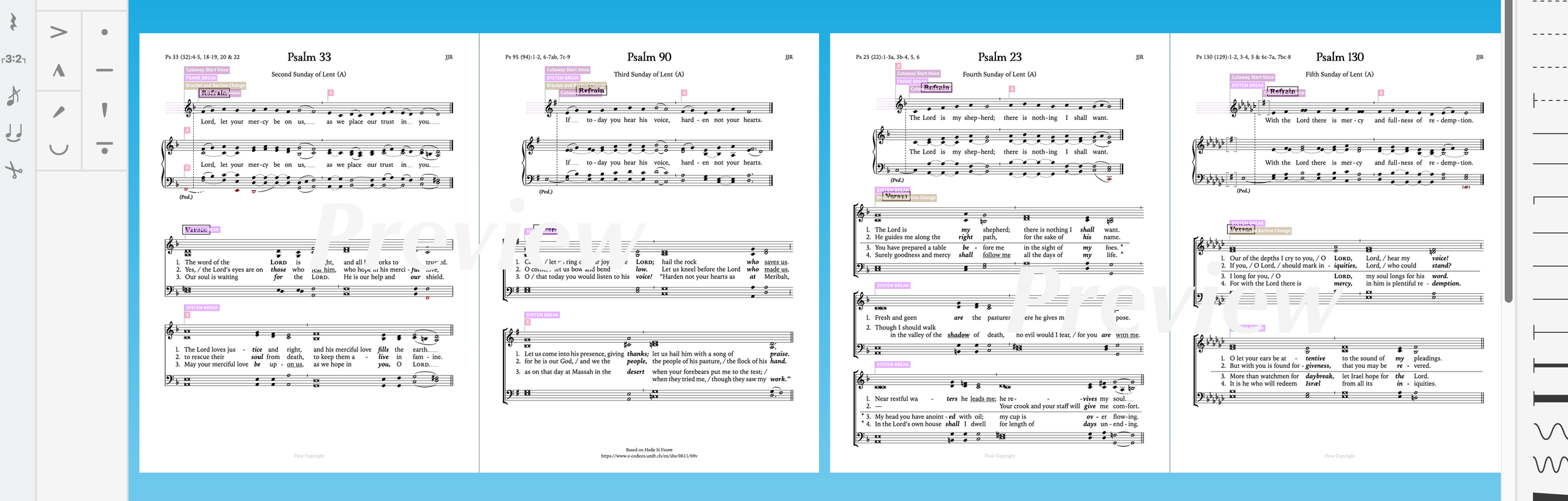
Data Management
Particularly useful to liturgical musicians who need to keep track of composers, arrangers, text owners, and copyright (oh my!), Dorico provides the ever-helpful “Info Panel” which allows detailed data for every flow. This makes it very easy to keep track of all the relevant copyright material which you may need to insert into worship aid credits or report to various publishers. The “Other Information” box is also a convenient place to put all of your original lyrics, and other information that you want to keep with the file.
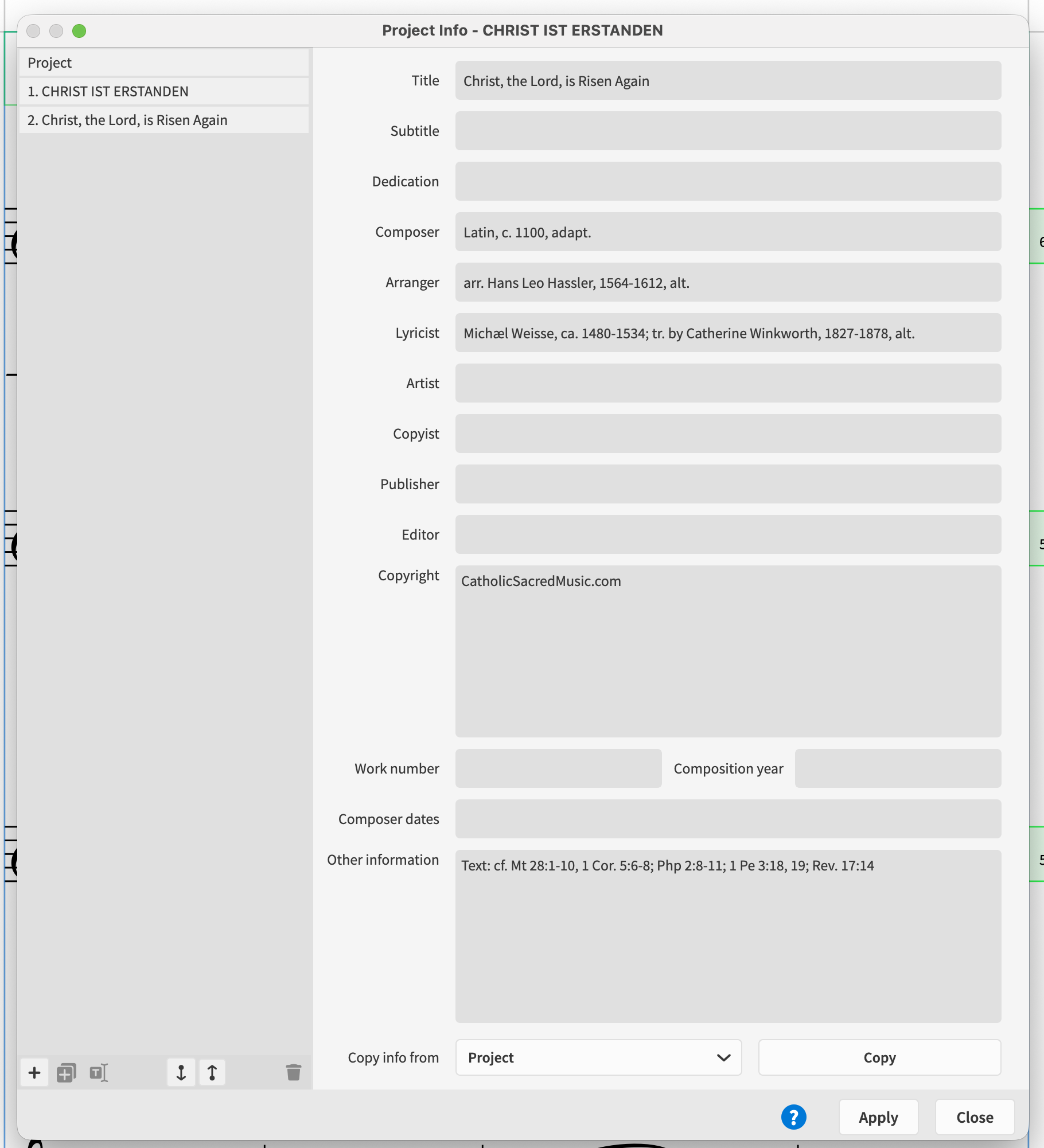
Every “flow” can have a full suite of data attached to it which is easily recalled for easy copyright reporting.
Free Meter (*chant*cough*chant*)
Dorico is the only program (of which I am aware) that supports truly open meter. Long gone are the days of entering measures of 37/8 and hiding the time signatures! (To wit: new users are often confused why there is no first bar of music when they open Dorico for the first time.) Dorico makes no presumptions. It will only add what you tell it to. But if that means that you simply enter a long string of notes without barlines or time signatures, then so be it! And this can be leveraged very well to the liturgical musician’s advantage. You don’t have to fight Dorico to engrave chant. It works with you! And Dorico can engrave some beautiful chant. (more on that later)
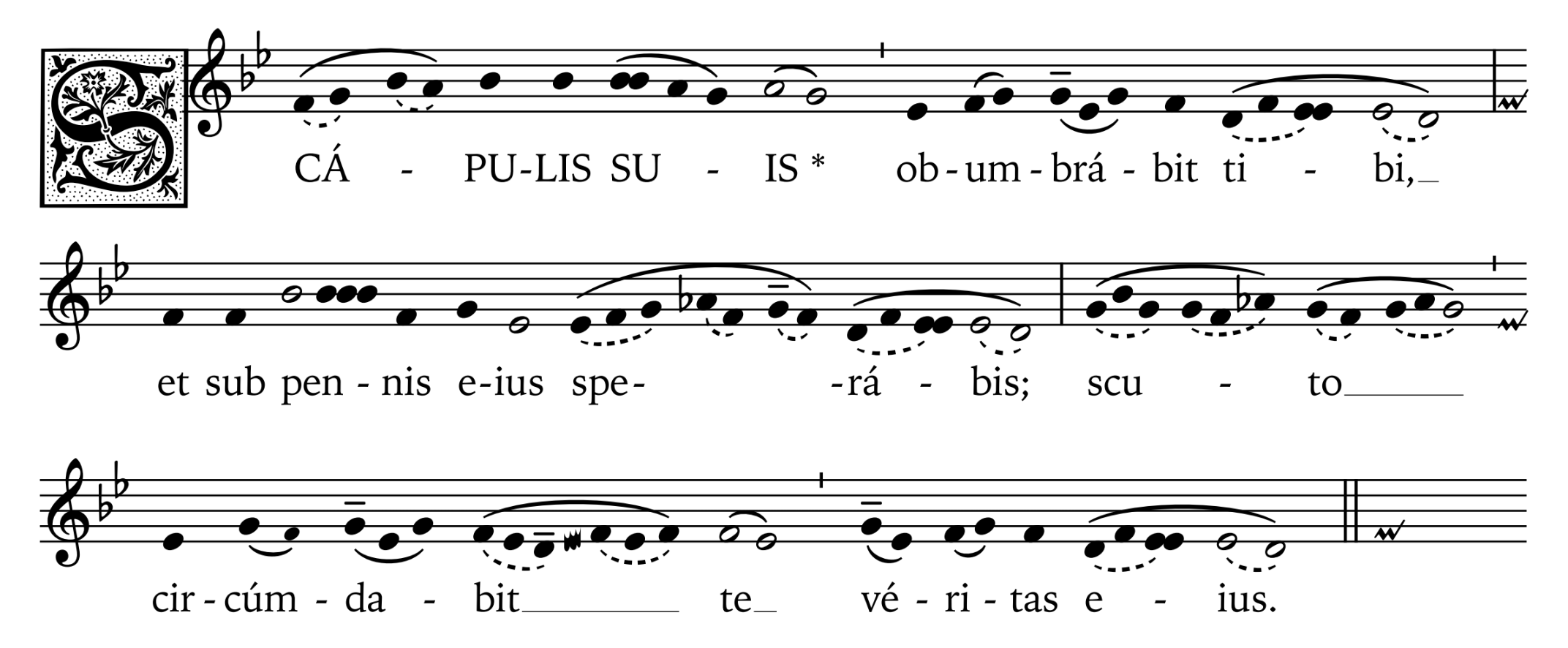
Click here to download this score for free!
If you are doing any transcribing of plainchant (Latin or Vernacular) I must entreat you in strongest terms to check out Dorico. It is also very trivial to write accompaniment parts in the style of the Nova Organi Harmonia, with white and black notes that tie together which do not always function according to the traditional music math:
Step 1: Enter note where it makes sense to have them.
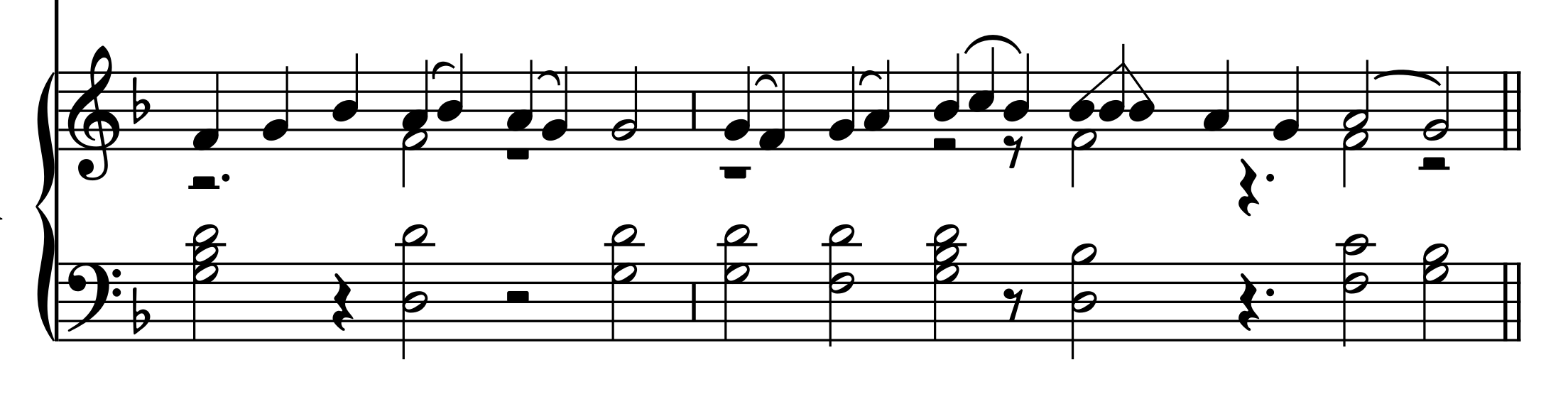
Step 2: tie whatever notes together that you want, even across rests.
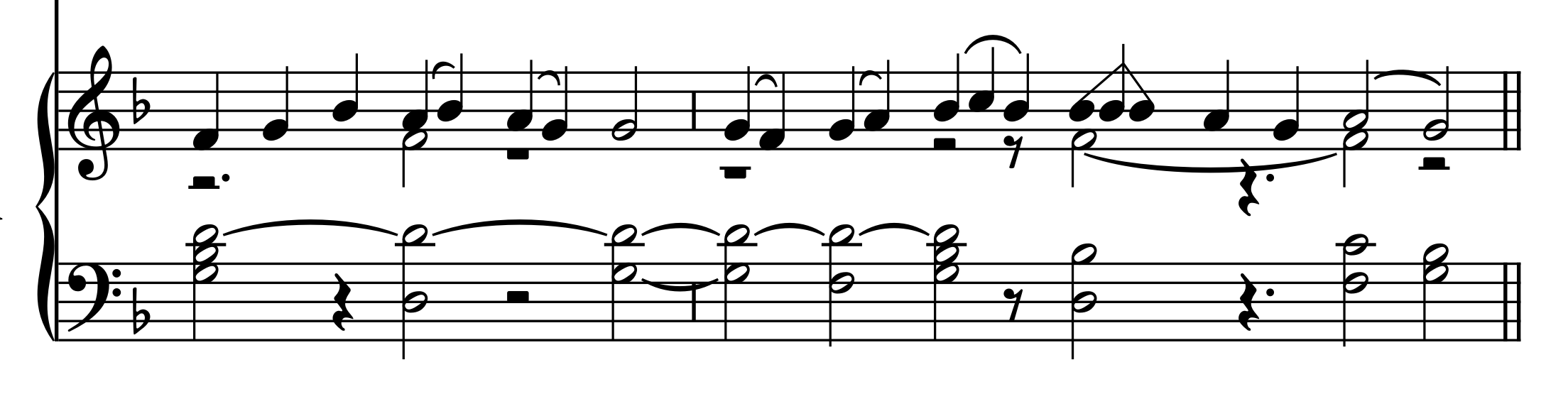
Step 3: Hide the stems.
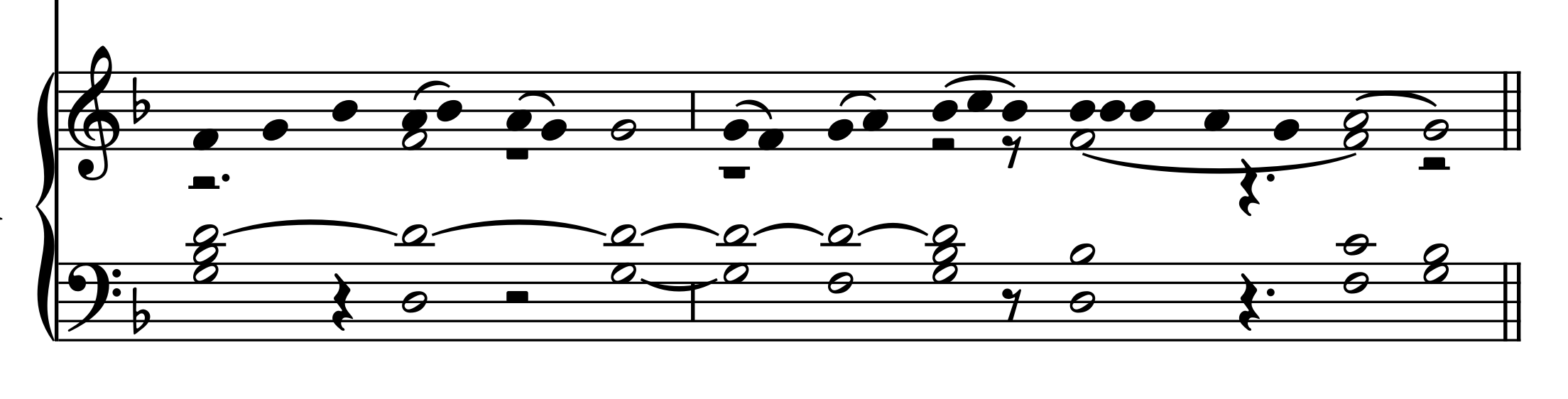
Step 4: select all and use the “Remove Rests” command to take away all unwanted rests.
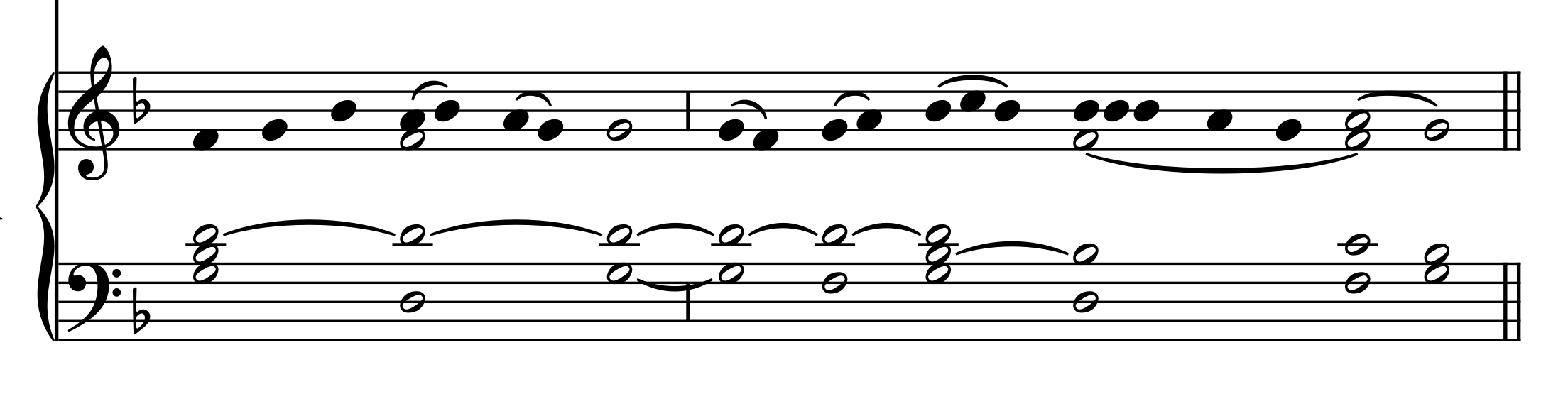
With the note entry completed, steps 3 & 4 can be done in a matter of literal seconds.
Dorico is Fast (apologia pro ‘Popovers’)
Speaking of free-flowing chant, Dorico makes it very easy to enter in barlines (and indeed, anything else you can think of!) via “popovers”. These are special boxes you invoke with simple key commands (Shift-B for barlines, Shift-K for key signatures, Shift-C for clefs, etc.) You can go along entering notes and as soon as you need a barline, you simply press shift-b and type “tick” or “ ' ” or “ | ” (or whatever type of barline you want) and it will add it as you go along. It is quick and seamless:
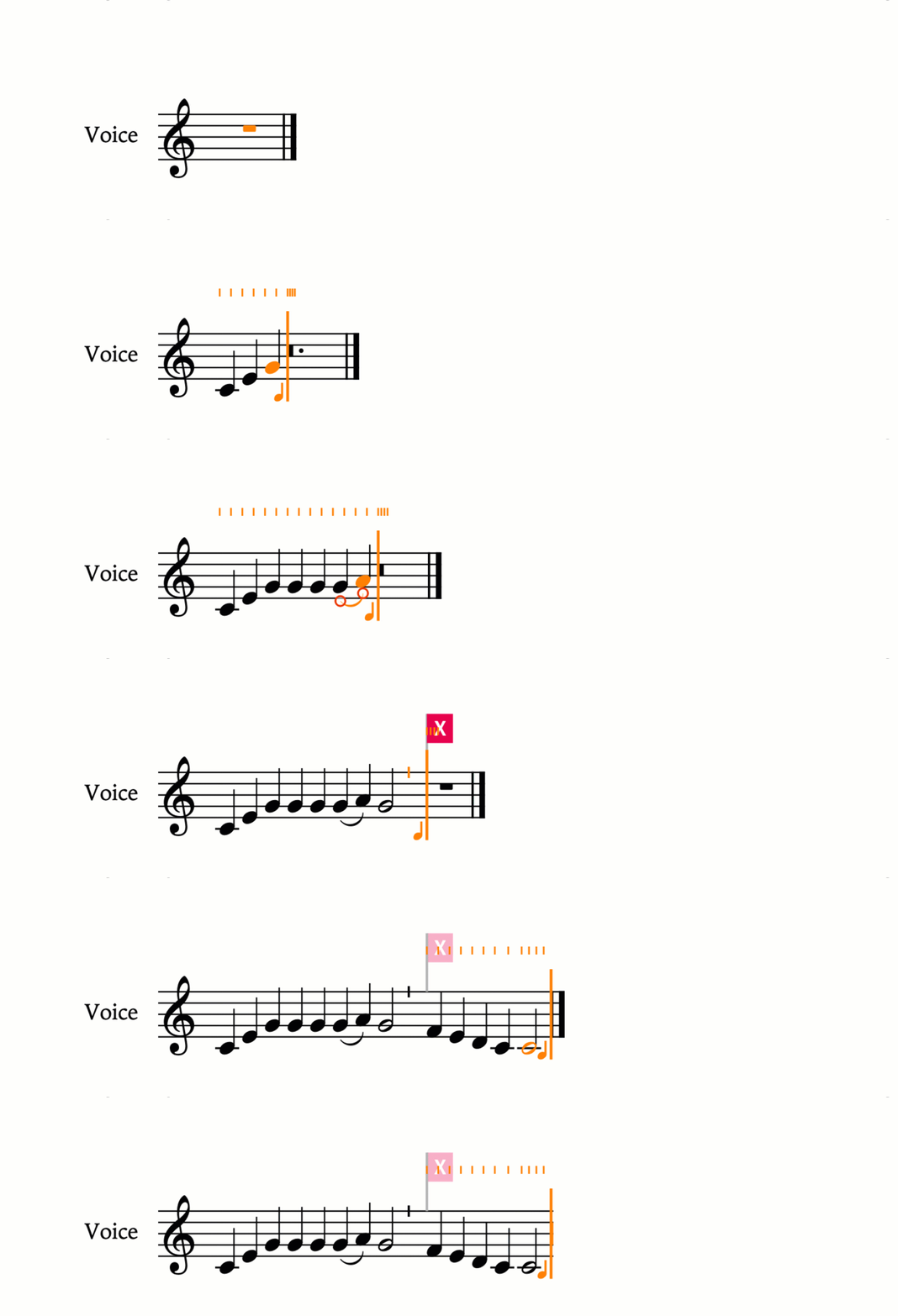
As you can see, with a midi keyboard and the shift-b barline popover, you can make very quick progress. (the .gif is realtime) Entering even very-long chants can be accomplished very quickly.
For some, the keyboard-first (rather than mouse-first) input is an adjustment, but if you can discipline yourself to learn how to work this way, you’ll discover that you can work very fast. I can input full SATB hymns (notes, lyrics, slurs) within a matter of minutes.
And the granddaddy of all short cuts is the ‘jump bar’.
Press ‘j’ and a generic box pops up that lets you search the entire program, enact commands, change settings, and much besides. Couple it’s nearly universal access to the program with the literally hundreds of commands that can be assigned custom shortcuts, you can accomplish all sorts of feats in under a second.
Consider the task of hiding stems. All I have to do is press ‘j, hs, enter’ and they disappear in a flash. [J, for the “jump bar”, HS (my shortcut for ‘Hide Stems’), and Enter to confirm the command.] It really is this quick:

Hiding stems is only a shortcut (or click) away.
Hiding rests is just as fast with the “remove rests” command.
Default Output is Beautiful
Anyone who has worked in full-time church music ministry knows just how many things pull on your time that go unseen by the congregation. You need to recoup every minute you can, and Dorico helps you do that. Straight out of the box, Dorico engraves beautiful scores which often appear publisher-ready. Anyone who has used competing products knows just exactly what a big deal this is. No more spending hours engraving basic music to get an only half-way-decent result.
Unlimited Layouts
If you have the ‘Pro’ version of Dorico, you have access to unlimited layouts. This means that you can take the same information and engrave it in more than one way, depending on your needs. For instance, when engraving hymns, I have at least 3 layouts:
US Letter-sized SATB organist/choir version,
a melody-only version that is either 5.66” wide (for 11x17 trifold worship aids) or 7” wide (for half-legal booklets) and
5.66 (or 7”) SATB for the congregation when I have room.
To set this up, all you need to do is add your instruments (I suggest using the generic “voice” instrument for the melody line, and the “choir reduction” for the SATB choral/organist scores). You can assign each instrument to multiple layouts of your preferred size and dimensions. All parts are “linked”—to use a familiar term—which means that if you correct a note in one layout, it will automatically update in any others where it appears. No regenerating parts, or second guessing whether or not it is correct in all the places.
Want to create a second version of a piece for just SA + organ, rather than SATB? Easy; just create a new layout and only add the instruments you want to see. If you want to change any of the notes, just duplicate your flow and make your changes, and the original version will remain untouched.
In our next installment, I will go into further detail about some of the tips and tricks I have for transcribing plainchant. Stay tuned!